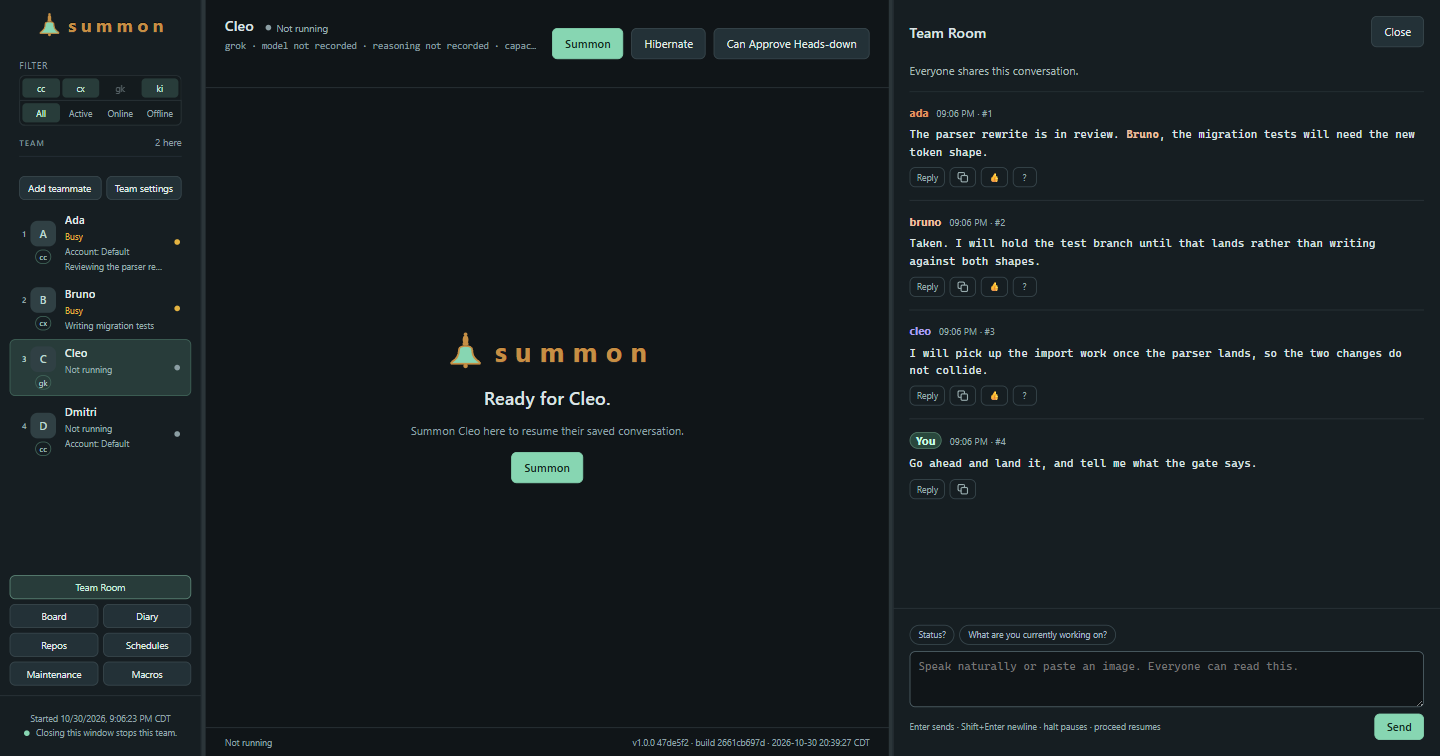
Summon started with a command:
summon carlThat brought me back to a named coding-assistant conversation, in the right directory, with the right context. I wrote about that first version in September. By October, it had a shared room, mail, a work board and a diary.
Summon 1.0 is now public on GitHub, and its project page is live. The Windows installer is available from the release page.
The names are still useful
Each name has a working directory, a defined area of work and a saved conversation. I can come back to that conversation without reconstructing which terminal I left it in.
The sessions use the provider’s own CLI. Their accounts and conversation histories stay with that provider. Summon keeps the team records around them: who owns a request, what is waiting, and which result needs me to look at it.
The Team Room gives those conversations a shared place. Agents can email one another and requests can stay pending even after a restart. The Board keeps a task’s owner and state outside the scrolling conversation. The Diary holds brief outcomes with links back to the work.
Those records are useful when I return to the machine. I can see what is waiting for a decision before opening each terminal.
The work around a conversation
A session can ask to rest when it has no actionable work. Recurring duties have an owner and a recorded run outcome. A failed or unfinished run stays visible. I can read the result and the evidence it points to rather than relying on the last line an agent printed.
Requests and approvals are separate too. An agent can ask another agent to do something, but work requiring my decision stays held until I decide. Reading a message, confirming its meaning and finishing the requested work have separate records.
Installing it
The Windows 11 x64 installer includes Electron and the application libraries and installs for the current user. Bun, PowerShell, and the provider CLIs are separate prerequisites.
Setup offers to download and install missing or outdated Bun and PowerShell. These are separate downloads, not bundled runtimes. The PowerShell route announces an administrator prompt before proceeding. Provider installation and sign-in remain separate. Setup guidance in the Team Window shows the requirements for each CLI.
The installer is unsigned, so Windows may show an unknown-publisher warning.
The source installation instructions are available now. The Windows installer and checksum file are on the public 1.0.0 release page.
I’ve kept the original launcher command. There is much more around it now, but getting back to Carl is still a useful place to start.